Phone Grips and Wireless Charging: What Works, What Blocks It (2026)

You buy a grip so you stop dropping your phone. Then you put the phone on your charging pad that night and nothing happens. This is the single most common complaint about phone grips, and it is not a defect - it is geometry.
The rule is simple: wireless charging needs a clear, flat, thin path between the pad's coil and the coil in your phone. Anything solid sitting on the middle of the phone's back breaks that path. Which means the question is not "is this grip good" but "where does this grip sit".
Why grips block wireless charging
Wireless charging is induction. A coil in the charging pad creates a magnetic field, a coil in the middle of your phone's back picks it up. Two things kill it: distance and metal.
Most standards tolerate a gap of only a few millimetres in total, and your case is already using part of that budget. A pop-out grip is 10 mm or more even when collapsed. A ring holder adds a metal ring directly over the coil, which is worse - metal in a changing magnetic field heats up rather than passing energy through.
It also has to sit flat. A grip in the centre of the back turns your phone into a wobbling see-saw on a flat pad. Even where charging technically starts, the phone often slides out of alignment and quietly stops overnight.
What blocks it, and what does not
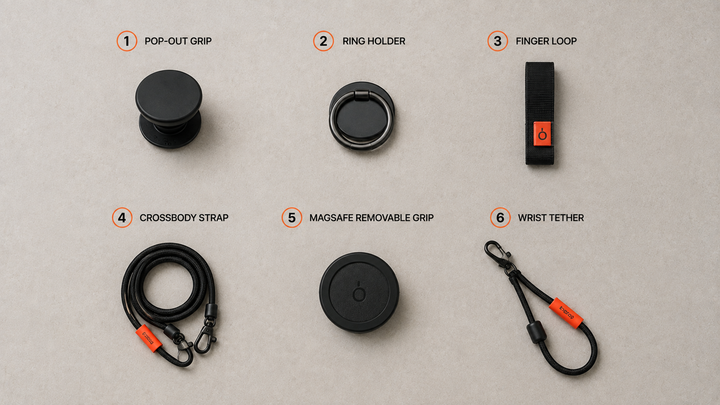
| Accessory | Where it sits | Qi wireless charging | MagSafe |
|---|---|---|---|
| Pop-out grip (PopSocket style) | Centre of the back | Blocked | Blocked |
| Metal ring holder | Centre of the back | Blocked, can heat | Blocked |
| Adhesive finger loop | Back, often centred | Usually blocked | Usually blocked |
| MagSafe-compatible removable grip | Back, magnetically detachable | Works once removed | Works once removed |
| Wrist tether at the charging port | Bottom edge, off the coil | Works normally | Works normally |
| Crossbody strap on a case anchor | Side or corner | Works normally | Works normally |
The pattern is clear once you see it laid out. Anything anchored at the edge of the phone leaves the coil alone. Anything anchored on the back is competing with your charger for the same few millimetres.
Qi, Qi2 and MagSafe: what changes
Qi2 and MagSafe both add a ring of magnets around the charging coil so the phone snaps into alignment. That fixes the wobble problem, not the thickness problem. A pop grip stuck over the magnet ring still blocks the connection, and it also stops the magnets from gripping - so MagSafe wallets, car mounts and stands all stop working too.
This is why the accessory world moved to detachable magnetic grips. They are a genuine improvement, with one honest caveat: a grip you have to remove before charging is a grip you will sometimes forget to put back on. Which brings you back to an unprotected phone at exactly the wrong moment.
The port-anchored approach
There is a third option that sidesteps the trade-off entirely: attach at the bottom edge instead of the back.
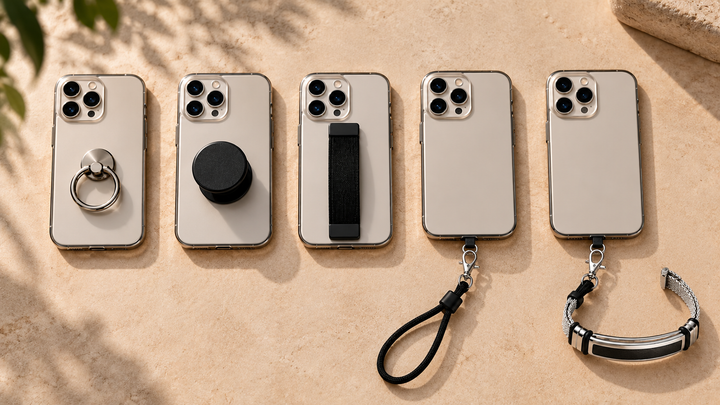
A thin tether tab slides between your phone and its case so the anchor point sits at the charging port, at the very bottom of the phone. The back stays completely flat and completely clear. Wireless charging, MagSafe magnets, car mounts and camera lenses all behave exactly as they did before.
That is how PHLOOP is built - the tab is well below the charging coil, so you can drop the phone on a pad face-up without removing anything. It also means nothing is stuck to your case with adhesive, which matters more than people expect in Indian heat.
How to test your own setup in 30 seconds
- Put the phone on the pad with the grip attached as you normally carry it.
- Watch for the charging indicator - and then check again after two minutes. Plenty of setups start charging and then drift out of alignment.
- Feel the back of the phone. Noticeable heat around a metal ring is a warning sign, not just inefficiency.
- Check the morning after. The real test is an overnight charge, not a ten-second one.
Choosing a grip if you charge wirelessly
- Anchor at the edge, not the back. Port-anchored tethers and case-anchored straps never interact with the coil.
- If you want a back grip, make it detachable. Magnetic removable grips are the best of that category - just be realistic about remembering to reattach.
- Avoid metal rings entirely if wireless charging matters to you. Heat is the issue, not just blocked charging.
- Watch total thickness. Your case already spends part of the millimetre budget before the grip does.
- Skip adhesive if you can. Heat and sweat beat adhesive over a long enough Indian summer, and the failure mode is your phone hitting the floor.
Frequently asked questions
Does a PopSocket block wireless charging?
Yes. A pop-out grip sits over the charging coil and is far thicker than the gap wireless charging tolerates, so the phone will not charge with it attached. Removable magnetic versions charge only once detached.
Do phone rings affect wireless charging?
Metal ring holders block charging and can heat up, because metal in a changing magnetic field absorbs energy instead of passing it through. This is the one type worth avoiding outright.
Can I use a phone grip with MagSafe?
Only if it is MagSafe-compatible and removable, or if it attaches at the edge of the phone rather than the back. Anything permanently covering the magnet ring disables MagSafe charging, wallets and mounts.
Do phone straps and tethers block wireless charging?
No. Straps and tethers anchor at the charging port or a case cutout, well away from the coil, so the back of the phone stays flat and clear.
Why did my phone stop charging overnight?
Usually alignment. A grip on the back makes the phone rock slightly, and a small shift is enough to break induction. This is why the two-minute and next-morning checks matter more than the initial indicator.
PHLOOP anchors at the charging port, so your phone charges wirelessly with the tether still attached. See how it works →
Related reads

Enjoyed this? Get the next one.
Join the PHLOOP list for new guides, product drops, and announcements. No spam.
Keep reading