Bracelet Phone Holder for iPhone & Android: Does It Fit Your Phone?

This is the question we get more than any other - at stalls, in Instagram DMs, from my own relatives: "okay, but will it fit MY phone?" Usually while holding up some model we've never heard of, in a case with glitter in it.
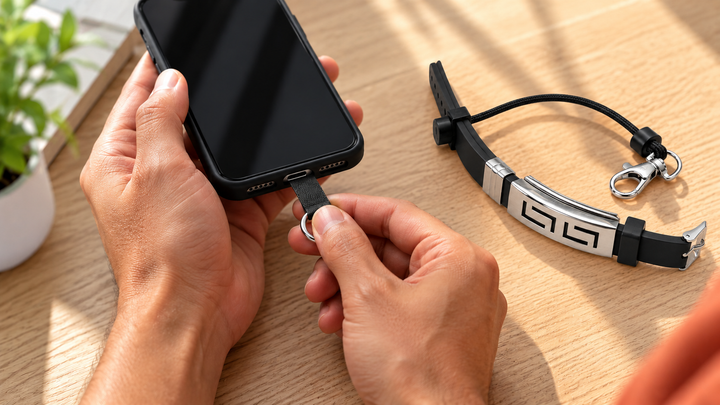
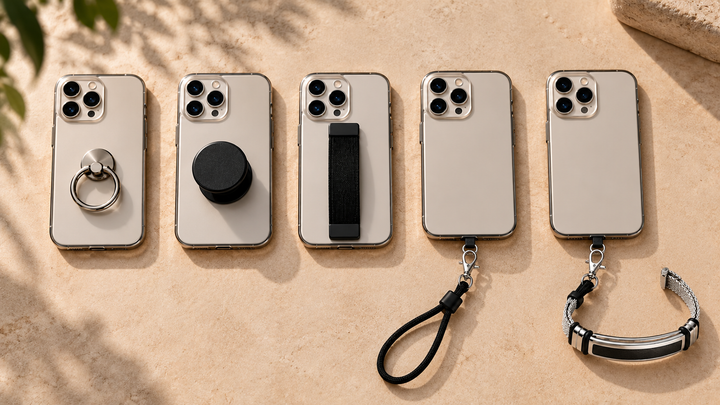
The answer is almost certainly yes, because a PHLOOP doesn't attach to your phone at all. The slim tether tab tucks inside your phone case, with the connector sitting at the charging port. The only requirement: your case must be closed at the bottom so the tab is held in place. No adhesive, no special mount, no model list to check.
How compatibility works
Most accessories attach to a specific phone - which is why a mount for an iPhone 15 is junk the day you switch to a Pixel. We deliberately designed around the one thing every phone has in common: a case. The tether tab sits flat between your phone and its case, anchored at the charging-port edge. The case holds it; the phone never touches it.
That design choice quietly solves three problems at once: it survives your next phone upgrade (just move the tab to the new case), it leaves zero residue, and the load of a caught drop spreads across the whole case instead of stressing one glued point. That's why the same PHLOOP has been clipped to iPhones, Samsungs, Redmis, and one customer's ancient phone we couldn't identify - it worked anyway.
Confirmed compatible
- iPhone - all recent models (iPhone 12 through the latest Pro Max) in a standard case.
- Samsung Galaxy - S, Note, A, M, and Z Flip/Fold series in a case.
- OnePlus, Google Pixel, Nothing, Xiaomi, Redmi, Realme, Vivo, Oppo - any model in a bottom-closed case.
If your phone has a case that wraps the bottom edge, you're in.
Case types: what works and what doesn't
| Case type | Works? | Notes |
|---|---|---|
| Silicone / TPU (the standard soft case) | Yes | The ideal pairing - snug hold on the tab |
| Hard polycarbonate | Yes | Works great; check the bottom edge is fully closed |
| Leather / fabric | Yes | No issues |
| MagSafe-compatible cases | Yes | The tab sits at the bottom edge, nowhere near the magnet ring |
| Rugged cases (multi-layer) | Yes, usually | Very thick inner liners can need a firmer push - tab still fits |
| Flip / wallet covers | Yes, if the back shell is closed at the bottom | The tab sits in the shell, not the flip |
| Bumper-only frames | No | Nothing holds the tab - switch to any standard case |
| Open-bottom "minimal" cases | No | Same reason - the one genuine exception |
The one requirement (read this part)
Your case must be closed at the bottom. That's it. The vast majority of cases - silicone, TPU, leather, hard shell, the ₹99 one from the metro station - all qualify. The exceptions are bumper-only frames and open-bottom "minimal" cases, which have nothing to hold the tab against. If that's you, any standard case fixes it.
What about charging and ports?
The tab is ultra-thin and sits flush, so wired charging works normally - cable goes in right next to it. Wireless charging is unaffected because there's nothing on the back of the phone at all. This surprises people who've had a PopSocket fight their charger for a year. Audio jacks and speakers are similarly untouched; the connector occupies the sliver of edge beside the port, not the port itself.
Foldables, small phones, big phones
Foldables: Z Flip and Z Fold work in a case closed at the bottom of the hinge-side half - the tab lives in whichever shell wraps the charging port. Small phones: no minimum size; the tab is smaller than a stick of gum. Big heavy phones: the cord is rated for 10 kg+ of tension, roughly 50 times the weight of the heaviest phone sold in India - an Ultra with a rugged case doesn't move the needle.
Troubleshooting fit (60 seconds)
- Tab feels loose? Re-seat it so the connector exits exactly at the port cutout, then press the case edge home. A correctly seated tab doesn't wiggle.
- Case bulges slightly? The tab isn't lying flat - reposition it away from the camera bump's interior curve.
- Cable won't seat fully? Nudge the tab a millimetre sideways; the connector should sit beside the cable, not under it.
- Changed your case? Move the tab across and do the one-tug test. That's the entire maintenance schedule.
Frequently asked questions
Does a bracelet phone holder fit iPhone?
Yes - all recent iPhones in a standard bottom-closed case. The tether tab tucks inside the case at the charging port.
Does it work with MagSafe cases?
Yes. The tab sits at the bottom edge of the case, well away from the MagSafe ring, so magnetic charging and accessories work normally.
Do I need a special case?
No. Any normal case that's closed at the bottom works - silicone, TPU, leather, or hard cases all fit.
Will it block charging?
No. The tab is thin and flush, so both wired and wireless charging work as usual.
What happens when I upgrade my phone?
Move the tab into the new phone's case and carry on - the bracelet doesn't care what phone it's protecting.
One PHLOOP, basically every phone. Get yours →
Related reads

Enjoyed this? Get the next one.
Join the PHLOOP list for new guides, product drops, and announcements. No spam.
Keep reading